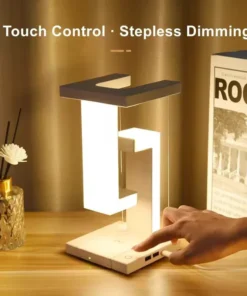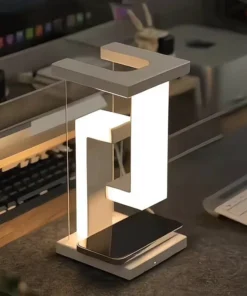
Explore LED lighting at MRL Bazaar for reading tables, study corners and desk setups. The current listing is the ET Wireless Charging and Anti-Gravity Desk Light, which combines a floating-style lamp design with charging features. Open the product card to review its photographs, controls, specifications and current availability.
Matching a desk lamp to your setup
Consider where the lamp will sit and how much space you need for books, a keyboard or other equipment. Check the product’s stated dimensions and power requirements. Think about the direction of the light and whether the available controls suit reading, working or relaxing at your desk.
The ET listing describes three lighting modes, touch controls and stepless brightness adjustment. It also lists dual USB ports and a removable wireless charging pad. Review these details for the exact model, and confirm that your phone supports the required wireless charging method before relying on that feature.
Check which cables, adapters or accessories are included instead of assuming every item in a photograph is supplied. If a charging or power detail is unclear, contact MRL Bazaar. Browse our Gadgets collection to compare other useful products for your daily setup.
Plan the desk before choosing a light
A desk light should fit around the things you already use. Measure the clear area beside your books, monitor or keyboard, and compare it with any dimensions in the listing. Decide where the power cable can run without crossing your work area. A product photograph can show the overall design, but the listed measurements and connections are what help you plan a practical setup.
Think about the tasks you will use the light for. Reading a printed book, working on a laptop and adding background lighting can require different positioning. Check how the lamp can be placed and which controls are listed for the exact model. Review brightness adjustment and lighting modes separately; the presence of a mode does not establish a measured brightness or colour accuracy.
Review the ET desk-light features
The current ET desk-light listing describes a floating-style design, touch controls, three lighting modes and stepless brightness adjustment. It also lists dual USB ports and a removable wireless charging pad. Use these listed features to identify the questions you need answered for your own desk. If an instruction or connection detail is absent, contact our team with the product name before ordering.
Wireless charging depends on the device you plan to charge. Check the phone’s manufacturer guidance as well as the charger’s listed requirements. Do not assume that every phone, case or accessory works with a wireless pad. Where charging power or an adapter specification matters, confirm it for the exact product rather than guessing from the appearance of the lamp or its USB connections.
Set up and care for a desk light
Review the supplied setup instructions before connecting the lamp. Identify which power source, cables and accessories are included and which items, if any, you need separately. Choose a stable position with space for the lamp and the objects around it. Keep the cable clear of moving furniture and follow the manufacturer’s placement guidance for any floating or removable part.
Use the operating instructions for changes to brightness, lighting mode and charging functions. Keep liquids away from powered equipment and disconnect it before cleaning where the instructions require this. Avoid using a cleaning method just because it is suitable for another lamp. Different finishes and electronic parts can need different care, so follow the guidance supplied for the model you receive.
Questions to ask before ordering
Will the light fit beside my monitor? Compare the available space with the product dimensions, and ask if a needed measurement is missing. Is a phone charger or adapter included? Confirm the package contents in the listing or with our team. Can I use the USB ports and wireless pad together? Check the model’s operating and power guidance before depending on a particular combination.
The individual product page shows the current ordering options and price. Open it to check photographs and stated specifications, then choose the option you want. For an unanswered compatibility question, include your device model and the lamp link in your enquiry. The wider Gadgets collection can help you compare other additions to your reading, study or work setup.